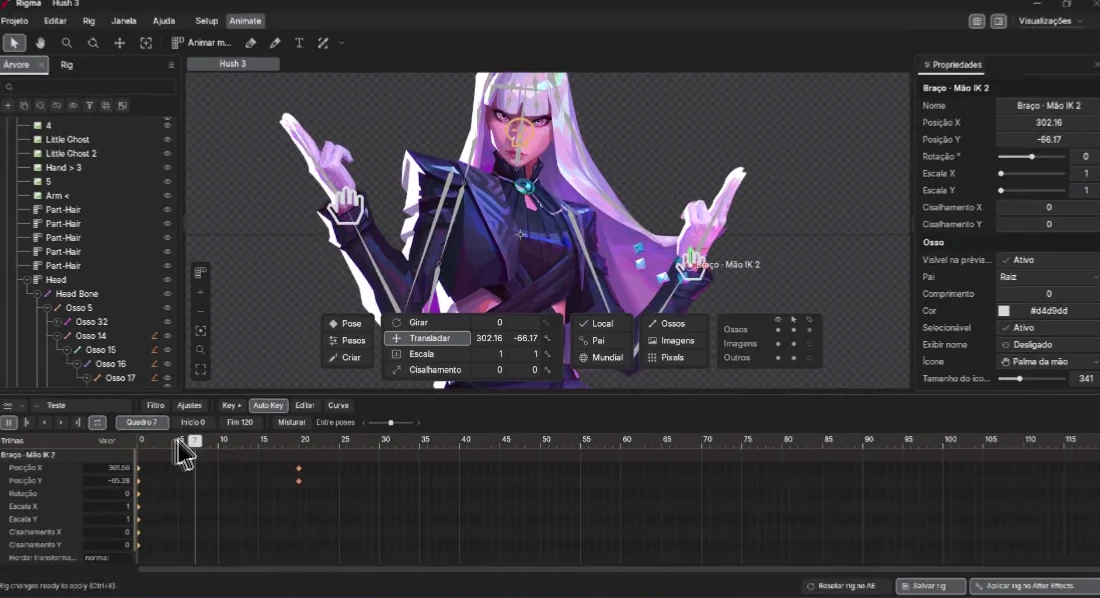
Rigma is Loombone’s plugin for rigging and animating 2D characters in Adobe After Effects. Build a skeleton over your illustration, bind the artwork, and apply the rig to your composition.
The Windows x64 installer supports Adobe After Effects 2024 and later.
Pose the arm from the hand
Start with Rigma’s Arm Rig preset. Fit the shoulder, elbow, wrist, and fingertip guides to the artwork to place the joints where the arm should bend.
Drag the hand’s IK control to position the hand. The upper arm and forearm follow, so you can try a new gesture without rotating each bone by hand.
Watch demo
Hair physics
Fit a three-bone chain to the lock of hair, starting at the scalp and following its curve. The chain gives the strand several points to bend around.
Turn on the physics simulation and adjust the wind strength, variation, and rhythm. The strand sways as you tune the controls, so you can preview the motion without keyframing each bone.
Watch demo
Mesh and weights
Trace the outline of the face and place mesh vertices around the eyes and mouth. These points give you local control over how the artwork deforms.
Bind the mesh to two bones, then paint their weights on the face. A higher weight makes a vertex follow the selected bone more closely, so you can control which areas move and where the deformation tapers off.
Watch demo
Animate character poses
Pose the character with its hand and arm controls, then set keyframes on the After Effects timeline to record each pose.
Scrub the timeline to review the motion between poses. Rigma keeps the character rig connected to the composition, so you can adjust the controls and refine the animation in After Effects.
Watch demo